
QR code photo album: what it is and how to make one
A QR code photo album is a shared online album that guests open by scanning a QR code with their phone camera. Everyone adds the photos and videos they took, and the host ends up with one album instead of chasing pictures across group chats.
- Guests scan a printed or on-screen QR code and upload from their phone browser. With Picsylo there is no app to install and no account to create.
- It works for weddings, birthdays, bar and bat mitzvahs, baby showers and company events.
- Picsylo costs a one-time $9.99 (Mini) or $19.99 (Standard) per event, with unlimited guests.
- Setup takes a few minutes: create the album, print the QR code, put it where guests will see it.
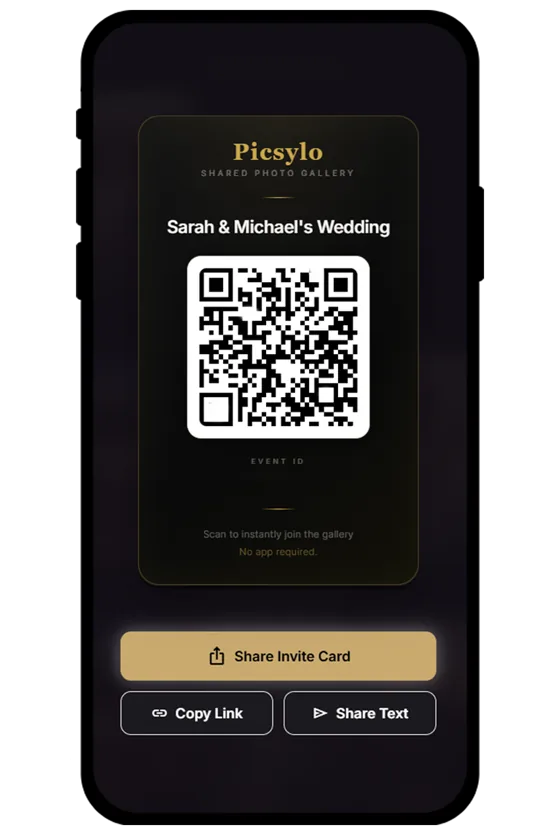
How a QR code photo album works
- The host creates an album. You name the event, pick a date and get a unique link and QR code.
- The QR code goes where guests can see it. Table cards, a welcome sign, the bar, the invitation, or a slide on the venue screen.
- Guests scan and upload. The phone camera recognises the code and opens the album in the browser. Guests pick photos and videos from their camera roll or take new ones.
- The album fills up live. New uploads appear for everyone within seconds, and can run as a slideshow on a screen at the venue.
- The host keeps everything. After the event you download the whole album in original quality, or export it to Google Drive.
The QR code is only a shortcut to a link. What matters is what happens after the scan: whether guests have to install something, whether they have to sign up, and whether the photos keep their original quality.
What you need to make one
You need three things: an album service, a printed (or displayed) QR code and a phone signal or Wi-Fi at the venue. With Picsylo the steps are:
- Open picsylo.com and create your album. You can try the free demo first to see what guests will see.
- Choose a QR card design and download it. Print one card per table, plus a larger sign for the entrance.
- Scan the code yourself before the event and upload a test photo.
- Ask your DJ, MC or a friend to mention the QR code once people are seated. A single announcement makes a big difference.
For placement, wording and printing tips, see how to set up a QR code for wedding photos.
What it costs
Most QR photo album services charge once per event. The best-known ones start at roughly $39 to $49 for a paid plan, and some have free tiers with tight upload limits. Picsylo is priced lower:
Checked on 2 October 2026. * From independent comparisons published in 2026. Sources and full comparison.
Other services list their prices in US dollars. They are converted here at about to the dollar and rounded.
Picsylo has two plans:
- Storage
- 2 GB (about 700 photos)
- Album open for
- 7 days
- Unlimited guests
- AI face search
- Printable QR cards
- Original quality photos and videos, no compression
- ZIP download of the whole album
- Storage
- 10 GB
- Album open for
- 30 days
- Everything in Mini
- Live slideshow for venue screens
- Export to Google Drive
- Co-hosts and moderation
- Extra storage: $1 per 10 GB
Everything you get with Picsylo
- One-time payment, no subscription
- Unlimited guests, no per-guest fees
- No app and no sign-up for guests
- Original quality photos and videos, no compression
- AI face search: guests find their photos with a selfie
- Printable QR table cards you can customise
- Download everything as one ZIP file
- Hide or delete any photo, or approve uploads first
- Works in 7 languages
- Free 10-minute demo before you pay
- Live slideshow for a TV or projector Standard
- Disposable camera mode with a timed reveal Standard
- One-click export to Google Drive Standard
- Co-hosts and official photographers Standard
- Extra storage only if you need it, $1 per 10 GB Standard
- Give an album as a gift
There is no subscription and no per-guest fee. If you want the album to stay online longer, you can extend it by six months or a year. Full details are on the pricing page, and a side-by-side look at other services is in our comparison of QR code photo sharing apps.
What to look for when you choose a service
- No app for guests. If the scan leads to an app store, many guests will not bother. A browser-based album opens straight away.
- No guest sign-up. Typing an email and a password at a party is a hurdle. Look for upload without an account.
- Original quality. Messaging apps shrink photos. A good album keeps the original files.
- A way to find your own photos. With hundreds of uploads, scrolling is slow. Picsylo includes face search: a guest takes a selfie and sees the photos they appear in.
- Host control. You should be able to hide or delete photos, especially if the album is shown on a screen.
- An easy way out. One-click download of everything, or export to your own cloud storage.
- How long the album stays online. This varies a lot between services. Check it, and download your photos before the window closes.
Can you make a QR code album for free?
Yes, in a basic form. You can create a shared album in Google Photos, copy its link and turn the link into a QR code with any free QR generator. It costs nothing and works well for a small group who all use Google.
The limits show up at larger events: guests need a Google account to add photos, there is no live slideshow or moderation, and nobody can search for their own face. A dedicated service removes those hurdles for a small one-time fee, which is usually worth it for a wedding or any event with more than a few dozen guests.
Where people use QR code photo albums
- Weddings: table cards at the reception, and a slideshow of guest photos during dinner.
- Birthdays and private parties: one code at the bar or on the invitation.
- Bar and bat mitzvahs, engagements, baby showers: family members of every age can join because there is nothing to install.
- Conferences and company events: attendees upload from work phones without installing an app, and marketing gets real photos the same day.
Frequently asked questions
What is a QR code photo album?
It is a shared online photo album that opens when someone scans a QR code. Guests at an event scan the code with their phone camera and add their own photos and videos, so the host collects everything in one place.
Do guests need to download an app?
Not with Picsylo. The album opens in the phone browser on iPhone and Android, and guests do not need to create an account.
How much does a QR code photo album cost?
Picsylo costs a one-time $9.99 for the Mini plan or $19.99 for the Standard plan, per event, with unlimited guests. Other well-known services usually start at around $39 to $49 for a paid plan.
How many guests can upload?
Picsylo has no guest limit. The plans differ by storage: 2 GB on Mini and 10 GB on Standard, with extra storage available.
How do guests find photos of themselves?
Picsylo includes AI face search. A guest chooses to take a selfie, and the album shows the photos they appear in. Browsing the full album always stays available.
How long do the photos stay online?
Seven days on the Mini plan and thirty days on the Standard plan. You can download everything or export it to Google Drive, and you can pay to extend the album by six months or a year.